



Airbnb review
 Analysis by GetAllApps
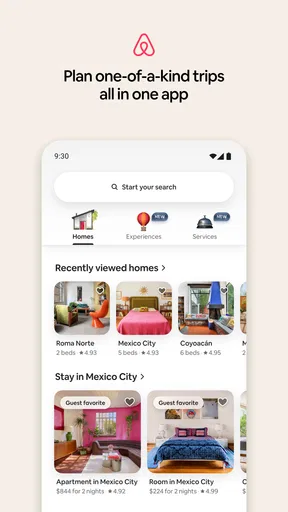
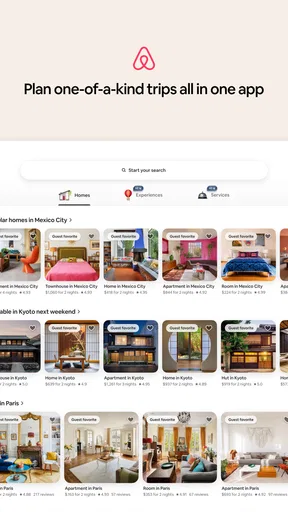
When I use Airbnb to plan a trip with other people, the biggest benefit is having the stay and much of the trip planning in one place. It is a travel app from Airbnb, but it is no longer just a way to browse homes: the current experience also brings experiences and services into the booking flow. That broader scope can be handy for a household or group, though it also means each person should be clear about whose account is being used and who is making the decisions.
Planning a stay together without sharing every decision
A familiar scenario is a family or group of friends choosing somewhere to stay for a weekend. One person may care most about the location, another about a kitchen, and someone else may be watching the total cost. I find the app most useful when one person does the initial search, then shares a small set of serious options for everyone to discuss. Browsing together without a shortlist can become an endless scroll, especially when each person has a different idea of what makes a place suitable.
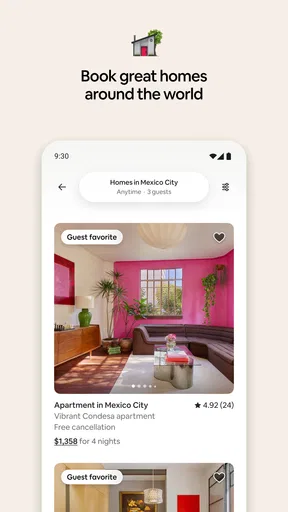
Airbnb’s home listings are the heart of the experience, and the app is designed around comparing individual properties rather than selecting a standard room from a uniform inventory. That gives a group more variety, but it asks you to inspect each choice carefully. I look beyond attractive photos and check the location, sleeping arrangements, house rules, and what the listing says about the spaces people will actually use. A place that looks spacious in pictures may still be awkward if the group needs quiet bedrooms or a shared area where everyone can sit.
For shared-device use, I would treat the phone or tablet as a viewing tool, not as a shared household account. It is easy for several people to browse on one screen, but booking decisions, messages, and account activity belong to the signed-in person. Before anyone starts entering details or contacting a host, agree who is responsible for the account and who has authority to confirm plans. This simple boundary helps prevent the classic group-trip confusion of one person assuming a reservation is final while another is still comparing alternatives.
Keep account access and booking responsibility clear
Airbnb is free to download, and I see that as a low-friction way to start exploring. The actual cost of a stay or other booking is a separate matter, so I would not treat “free” as meaning a trip itself is free. If several adults are involved, it is usually cleaner for the person handling the reservation to use their own account and share the relevant details with the rest of the group, rather than passing around login access.
That approach matters when plans change. The booking account holder is the natural point person for reading messages and keeping track of what has been agreed. Other travelers can still contribute by reviewing listings, dates, and practical needs before anything is committed. I recommend deciding in advance who will make the final call, how costs will be split, and where the group will keep its own notes. The app helps with the travel transaction; it does not replace a clear conversation among the people going.
One useful workflow is to search with the group’s non-negotiables first, then compare only the options that meet them. For example, settle the dates and broad area before debating décor. Next, check whether the sleeping setup works for the actual people traveling, not just the total number of guests. Finally, read the listing details again before booking, because a photo-led first impression can make it easy to overlook a restriction or a mismatch. This sequence saves time and makes the app’s wide selection more manageable.
Coordination works best when the group has a point person
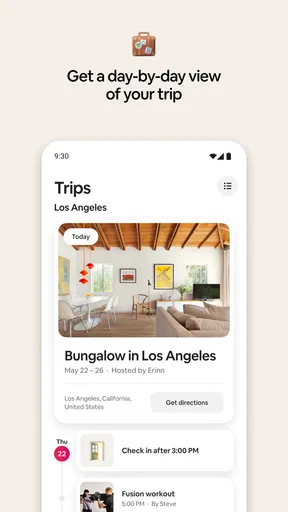
For a household planning a holiday, coordination is often more difficult than finding a place. The person who books should make sure the rest of the group has the arrival information and understands any host instructions relevant to the stay. I would keep essential details somewhere the travelers can access without having to borrow the account holder’s phone. That is especially useful if a family arrives in separate cars or if one adult is responsible for check-in while another handles the children.
The app’s expanded focus on experiences and services can help when a group wants to plan more than accommodation in one sitting. I would use those options as a starting point rather than assuming every activity suits every traveler. A relaxed adult outing may not work for a young child, and a household with different energy levels may prefer to leave some time unscheduled. The advantage is convenience; the trade-off is that adding more bookings can make the itinerary harder to coordinate. I would choose only what the group genuinely wants rather than filling every day because options are visible.
One practical tip is to separate “possible” from “confirmed” in the group conversation. A saved or discussed idea is not the same thing as a booking, and different people may interpret a screen or message differently. Have the account holder state plainly when a reservation has been completed and share the details that matter. This small habit is useful on any group trip, but particularly when several people are looking at the app on a shared device and taking turns browsing.
Trust, age, and the limits of a shared screen
The app is rated for Everyone, which makes it broadly accessible as software, but that should not be confused with a recommendation that children manage travel bookings. For younger family members, I would use the app together with an adult and keep payment and reservation decisions with the responsible grown-up. Children can help compare locations or talk about what they would enjoy, while an adult checks the practical details and handles the account.
That distinction also protects privacy and reduces accidental changes. A shared phone may be convenient for looking through places, yet it can blur who is signed in and who is expected to act. I would avoid leaving an account open for casual use by everyone in the household. If a child wants to explore, have an adult supervise the search and make it clear that browsing does not authorize a booking. There is no need to invent a complicated system: a simple adult point person and an explicit “we are only looking” rule are enough for most families.
Trust also means reading listings with a measured eye. The app gives travelers a way to compare homes, but a booking choice still depends on the particular property and the fit with your plans. I would not choose solely from a polished image or assume that a home’s style guarantees it will work for a group. Check the details that affect your own trip, and ask questions through the appropriate booking process when something important is unclear. For a household with accessibility needs, a very young child, or a traveler who needs a particular sleeping arrangement, those specifics should be settled before committing rather than guessed from photos.
Where it sits among travel alternatives
Compared with the usual hotel-booking approach, Airbnb is strongest when a group wants to consider whole homes and a more varied living setup. A home can suit travelers who want shared space or prefer to organize parts of their stay themselves. A conventional hotel can be the better choice when someone values a familiar front desk, standardized room expectations, or a simpler arrangement for a short overnight stop. I would choose based on the trip, not on the assumption that one format is always cheaper or more convenient.
Compared with general travel search tools, Airbnb’s identity is more focused on the stay and the individual listing, with experiences and services also available in the app. That can reduce the effort of jumping between separate planning ideas, but it does not make the app a complete answer to every travel need. If I only need a straightforward hotel room, I may prefer a service built around quick hotel comparisons. If I need a particular home layout for several people, Airbnb is more compelling because the individual property details matter so much.
Its scale is part of the appeal: the app has passed 100 million installs and holds an average rating of 4.5 from around two million ratings. Those figures suggest it is a familiar option for many travelers, but they do not tell me whether a particular listing is right for my family. I still judge the specific stay on its details and fit. The app is free, and its content rating is Everyone; those facts make trying it straightforward, but neither removes the need to read carefully before booking.
What to expect from the app itself
Airbnb was released on January 17, 2012, and version 26.42 is the current version. The long-running product has evolved from home discovery into a broader trip-planning experience, which explains why the app can serve both someone looking for accommodation and someone exploring what else to arrange. I find that breadth useful when I already know the kind of trip I want, but it can feel like extra choice when all I need is a bed for one night.
As with any app centered on individual places, the quality of the decision depends on the attention you give each listing. Photos make scanning easy, but they can also encourage snap judgments. I recommend pausing on the practical questions: does the location work for the day’s plans, does the sleeping layout suit the group, and are the house expectations acceptable to everyone? For a shared trip, one person may be happy with a compromise that another finds uncomfortable, so it is worth discussing these points before the account holder confirms anything.
The app is available for devices running iOS 9 or later. For older hardware, compatibility is worth checking before a trip rather than discovering a problem while traveling. I would also make sure the person responsible for the booking can access their account and essential trip information independently of the shared household device. That is not a special feature of Airbnb; it is sensible preparation when one person’s account is carrying the group’s arrangements.
My household verdict
I recommend Airbnb to households and groups who want to compare home-style stays and are willing to read the details instead of choosing from photos alone. It is especially useful when the group has distinct space needs, wants to browse experiences alongside accommodation, or benefits from one person taking charge of planning. The strongest way to use it is as a shared decision-making aid while keeping the account and final booking responsibility with one clearly identified adult.
I would skip it for a trip where a conventional hotel’s predictable setup and front-desk support are the priority, or when the group has no patience for evaluating property-specific details. It can also be a poor fit if everyone expects to make independent changes from one shared login. The app’s broad selection is valuable, but selection is not the same as certainty: each traveler should understand the arrangement before plans are finalized.
For my own planning, I would begin with the group’s needs, shortlist a few suitable homes, inspect the practical details together, and let one person handle the account and booking. Then I would share confirmed arrangements with everyone traveling and keep the rest of the itinerary flexible. Used that way, Airbnb is a capable travel companion rather than a substitute for communication. Its convenience comes from bringing several parts of trip planning together, while its best results still depend on a household being thoughtful about account boundaries, expectations, and the particular place it chooses.
Pros and cons
Pros
- Easy-to-use search filters help narrow down places to stay.
- Guest reviews offer useful insights before booking.
- The app keeps reservation details and messages in one place.
- Saved wish lists make it easy to compare future trips.
- In-app support helps guests contact Airbnb about booking issues.
Cons
- Cleaning fees can make the final price much higher.
- Some listings have strict cancellation policies.
- Check-in instructions vary and may require extra coordination.
- Listing photos may not show every drawback of a property.
- Availability and prices can change before a booking is confirmed.


